
100% Cloud Managed
The Mako System is uniquely designed to deliver a host of advanced services from a centrally managed interface in the cloud. Using a patented communications methodology, Mako Networks is able to help secure, protect and enhance the capabilities of business networks.
Services like Mako Guardian Content Filtering allow network administrators to set access permissions for websites by category or URL. Other tools, like proactive Status Alerts, help protect networks by automating monitoring processes and giving administrators the tools needed to respond. All services are delivered via the cloud, providing anytime/anywhere access through the Mako Central Management System.
*Purchase of hardware appliance and coud management license (part code 6500-A2) is required to complete a solution. All other licenses are optional.
Mako 6500-A2 Series Network Appliances.
The Mako 6500-A2 is an award-winning network security appliance for small sites and businesses that access the Internet via an ADSL connection. Some models of the 6500-A2 also feature an additional 3G connection, allowing business the option to connect to the Internet using a wireless signal if ADSL is not available. The Mako 6500-A2 incorporates a powerful firewall independently certified by ICSA Labs for network security, complemented by a host of technologies designed to help protect businesses that process, store or transmit credit card data.
The Mako 6500-A2 is an award-winning network security appliance for small sites and businesses that access the Internet via an ADSL connection. Some models of the 6500-A2 also feature an additional 3G connection, allowing business the option to connect to the Internet using a wireless signal if ADSL is not available. The Mako 6500-A2 incorporates a powerful firewall independently certified by ICSA Labs for network security, complemented by a host of technologies designed to help protect businesses that process, store or transmit credit card data.
Hardware Specification
- LAN Interface 2 x Ethernet RJ45 10/100 Mbps ports. Auto crossover.
- WAN Interface 1 x RJ11 ITU G.992 ADSL 1/2/2+ port
- Power Supply External 100 or 240VAC Input (50 or 60Hz)12VDC output
- USB Port For support functions (i.e. manual configuration).
- Chassis Dimensions 8.58 x 8.58 x 1.57 inches | 218 x 218 x 40 mm (L x W x H)
- Operating Temperature 41° F to 104° F | 5° C to 40° C
- Humidity 10% to 90% relative, non-condensing
- Hardware VPN Encryption Supported
- Power Consumption 10W – Typical
Compliance Specification
- ADSL Standards ANSI T1.413 i2ITU G.992.1 G.dmt (ADSL1)ITU G.992.3 (ADSL2)ITU G.992.5(ADSL2+ – Annexes A & M)
- Network Protocols PPP over ATM (RFC 2364 PPPoA)PPP over Ethernet (RFC 2516 PPPoE)BridgedEthernet over ATM (RFC 1483 /RFC 2684)
- Electromagnetic Compliance EN55022 – CSPIR 22 Class B (EMC)EN55024 – CSPIR 24 (Immunity)FCC Part15 Class B
- Safety Standards CB, IEC 60950, EN 60950 & AS/NZS 60950
- U.S. Compliance FCC part 68
- EU Telecoms ITU-T G.992.3 & G.992.5 (Annex A & M)
- AU Telecoms AS/ACIF S041 & AS/NZS S043
- NZ Telecoms PTC 273 (ADSL)PTC 257 (3G)
- Environmental Lead-free and RoHS compliant
- Firewall ICSA-certified, Stateful Packet Inspection
Features and Benefits
- Centrally managed, automated software updates, 24×7 monitoring, remote office access, advanced diagnostics and syslogs
- Detailed reporting including Mako usage, PC usage, remote VPN, current status and more
- Control over Internet access, traffic threshold management, high usage notifications and worm alerts
- Simple, uncluttered interface with enhanced ease of use and navigation
- Dual LAN with DHCP
- Dynamic DNS support
- VPN – 20 concurrent IPSec, 10 concurrent PPTP
- ICSA-certified firewall
- Optional PCI DSS compliance and Mako Guardian content filtering
DSL Modem Specifications
- ADSL2+ supporting fast downloads with speeds up to 25 Mbps**
- Supports Annex A & M allowing uploads at speeds up to 2.5 Mbps (Annex M) and 1Mbps (Annex A)
Note: **Speeds indicated are for ideal conditions, actual maximum speeds will vary.
Complete Security
Mako 6500 appliances employ a range of industry-leading security technologies, such as a stateful inspection firewall, port scanning protection, worm detection, AES 128-bit encryption for Virtual Private Networks (VPNs), and support for Point-to-Point Tunneling Protocol (PPTP) remote network access.
PCI DSS Certification
Any business that processes, stores or transmits credit card data must meet security requirements set up by the credit card companies to help reduce fraud, known as the Payment Card Industry Data Security Standards (PCI DSS).
The Mako 6500-A2 is specially built with the PCI DSS in mind, allowing businesses to quickly and easily lock down computer and payment networks.
Mako Networks was the first company in the world to hold a Level 1 PCI DSS certification for network management, the highest level of certification available.
Easy to Deploy
Like all Mako appliances, the 6500-A2 automatically receives configuration information from the Mako Central Management System (CMS) via the cloud, so there’s little to set up besides plugging in power and network cables.
Easy Setup Virtual Private Networks
External networks connected by Mako appliances can be linked to the Mako 6500-A2 in seconds by three easy mouse clicks in the CMS, without requiring static IP addresses. Each 6500-A2 can simultaneously link up to 20 external VPNs. The Mako 6500-A2 can also connect to third-party equipment and firewalls.
Centralized Logging/Reporting
Mako 6500-A2 appliances securely send traffic information back to the CMS every few minutes. This data is used to generate easy-to-understand graphical reports about network usage, including data use by site, user and timeframe, real- time reporting of intrusion attempts, and records of Internet traffic. Based on this information, the CMS can also send proactive alerts regarding data usage, device temperature, worm detection, and more.
Integrated Router
Mako 6500-A2 units incorporate a fully featured ADSL router to provide access to the Internet at speeds up to 25Mb per second.
Simple Troubleshooting
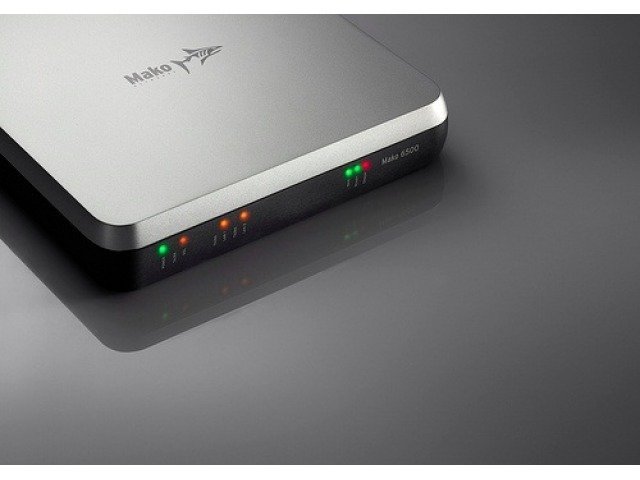
A color-coded LED panel on the Mako 6500 provides Internet and network connection information at a glance. For non- technical users, this makes it easy to quickly diagnose network issues. When technical support is needed, helpdesk technicians use the CMS to view and control appliance status, connections and configuration, making it easy to troubleshoot and resolve issues without the need for site visits.